
This article was updated in January 2026
Modern organizations create hundreds of SharePoint sites for projects, departments, and temporary initiatives. Over time, many of these sites become unused, turning into inactive sites. This not only clutters storage but also makes document search difficult, slows down employee workflows, and increases infrastructure maintenance costs.
SharePoint Advanced Management inactive sites refers to a comprehensive set of Microsoft 365 capabilities designed to identify and manage inactive sites. It includes automation tools, policy configurations, analytics reports, and intelligent storage optimization recommendations. These solutions help companies maintain content relevance, reduce costs, and meet compliance requirements.
Key components of this approach include inactive site policy, site lifecycle automation, and AI storage recommendations. Together, they provide continuous oversight and enable efficient lifecycle management of SharePoint sites. At the end of this article, you’ll find a practical checklist to help you define inactivity policies, automate cleanup, and effectively manage inactive SharePoint sites.
What is SharePoint Advanced Management?
SharePoint Advanced Management is a Microsoft 365 module offering advanced control over the SharePoint environment. It enables centralized site management and the application of policies across multiple sites simultaneously. The tool includes additional security features, flexible administrator role settings, and activity management at the organizational level.
Administrators gain a comprehensive view of site usage, including last visit dates, unique user counts, and document change volumes. This transparency helps quickly identify resources that are no longer actively used. Additionally, the tools allow immediate configuration of automated actions to prevent digital clutter accumulation.
In large organizations, adopting Advanced Management significantly reduces IT workload, improves decision accuracy, and ensures compliance with both internal and external data governance standards.
Why It Matters for Managing Inactive Sites
Managing outdated sites is not just a matter of convenience but also one of cost and security. The longer unused data stays in storage, the higher the risk of obsolete but still sensitive information being present. SharePoint Advanced Management inactive sites capabilities help locate such resources and manage them systematically without the need for manual inspection.
The inactivity detection function analyzes recent user actions to generate a list of sites for further processing. Then, an inactive site policy can be applied to archive or delete sites based on predefined conditions. This method eliminates human error and accelerates workflows.
The result is a cleaner, safer SharePoint environment where users work with up-to-date information, and the IT department is freed from routine tasks.
Practical Example
A global consulting firm started implementing SharePoint Advanced Management by auditing all corporate sites. They set an inactivity threshold of 180 days, after which the system flagged over a thousand sites without recent changes. Site owners received notifications, and unconfirmed sites were archived.
Within three months, inactive content in the active environment decreased by 70%. This reduced storage costs and improved SharePoint search performance. Administrators noted that the process required significantly less time than manual reviews.
In another scenario, a healthcare provider implemented a 90-day policy but overlooked hybrid environments, leading to incomplete archiving. To mitigate, incorporate pre-policy audits: assess site dependencies and simulate for 30 days, reducing error rates by up to 50% based on recent implementations
This case confirms that automation and analytics in SharePoint Advanced Management inactive sites enable rapid, tangible results with minimal additional resources.
Automating Inactive Site Archiving
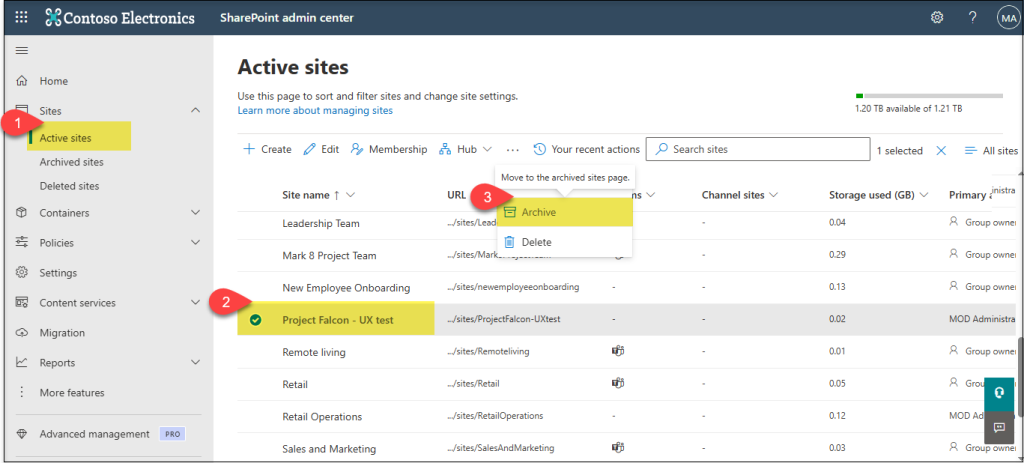
The inactive site policy feature automates the archiving of sites that have been unused for a set period. The process starts by defining the inactivity threshold, such as 90, 180, or 365 days. When a site hits this threshold, the system checks for activity and sends a notification to the site owner.
If no activity resumes, the site is moved to an archive. Archiving may include access restriction changes to prevent work on outdated documents. The policy settings allow choosing how long archives are kept or if they should be deleted immediately. This approach simplifies management, reduces costs, and helps focus on current projects.
Automation frees administrators from manually monitoring each site, which is critical in organizations managing thousands of workspaces.
Step-by-Step Guide to Enable Inactive Site Policy
Setting up an inactive site policy is a straightforward process that ensures your SharePoint environment remains clean and efficient. By automating the identification and archiving of inactive sites, you reduce manual workload and minimize the risk of retaining obsolete data. The following steps will guide you through creating and applying this policy in the Microsoft 365 SharePoint Admin Center, allowing you to keep your digital workspace well-organized and compliant.
- Sign in to the Microsoft 365 SharePoint Admin Center with administrator rights.
- Navigate to Policies > Inactive site policies.
- Click Create policy and define the inactivity period (e.g., 180 days).
- Specify the action to take after inactivity (archive or delete).
- Configure notification settings to alert site owners before archiving.
- Assign the policy to the desired SharePoint sites or groups.
- Save and activate the policy.
- Monitor the policy’s application through the Admin Center reports.
Following these steps ensures that inactive sites are efficiently managed with minimal manual intervention. The system will handle notifications and apply the appropriate actions based on your configuration, keeping your SharePoint environment optimized and compliant with organizational policies. Regularly reviewing the policy reports helps maintain oversight and adjust settings as your business needs evolve.
Before finalizing your policy, it helps to compare the key configuration options side by side. The table below summarizes the main settings you can adjust, along with practical recommendations for different scenarios. Use this as a quick reference when deciding on thresholds, actions, notifications, and scoping rules to ensure your policy aligns with both compliance requirements and team workflows.
| Policy Option | Description | Recommended Use Case |
|---|---|---|
| Inactivity Threshold | Set period after which a site is considered inactive (e.g., 90, 180, 365 days) | Short (90 days) for dynamic/project teams; long (365+ days) for departmental archives |
| Action Type | What happens to the site after the threshold is reached: Archive, Delete, or Read-Only | Archive for compliance-sensitive or historical data; Delete only for non-critical temporary sites |
| Notification Settings | Email frequency (e.g., weekly, monthly) and recipients (owners, secondary contacts) | Weekly reminders to owners for high-engagement teams; monthly for low-activity archives |
| Scope Filters | Limit the policy to specific site types or exclude others (e.g., Teams-connected, communication sites, exclude HR/Finance) | Exclude sensitive or regulated sites (HR, Finance, Legal); apply broadly to collaboration sites |
This overview allows you to quickly map your organization’s needs to the available settings and avoid common misconfigurations, such as overly aggressive deletion policies or missed notifications.
For a more detailed understanding of the inactive site policy setup process, you can watch the video. It demonstrates the advanced management features of SharePoint available through the SharePoint Advanced Management program. The author provides a comprehensive overview and demonstration of the new capabilities that can be useful for administrators and users.
Benefits of Automated Archiving
Automating archiving simplifies administration and makes management predictable. It saves time previously spent on manual activity checks, reduces error risk by enforcing consistent rules, and accelerates the removal of unnecessary content.
The main benefits include significant reduction of manual effort, elimination of human mistakes, and maintaining an up-to-date data environment. Over time, automation allows IT teams to focus on higher-value tasks instead of routine reviews. This is increasingly important as site numbers grow and data governance requirements become stricter.
Site Lifecycle Automation and Owner Notifications
Site lifecycle automation covers all phases from site creation to final deletion. Initially, the site’s creation date and owner are recorded. The system tracks user activity and sends reminders when usage declines.
If activity doesn’t resume, the site moves to archive storage for a defined retention period before permanent deletion. This approach allows planned storage cleanup and predictable data management.
As a result, organizations maintain a structured environment without forgotten sites, and owners bear responsibility for preserving or deleting content, improving transparency and reducing risks.
Comparison Table: Manual vs Automated Management
| Criterion | Manual Management | Automation |
|---|---|---|
| Time to Review | High | Low |
| Error Risk | High | Low |
| Scalability | Limited | High |
| Response Speed | Slow | Fast |
Custom reminders can bridge the gap between automated alerts and proactive owner engagement, ensuring timely confirmations.
Engaging Site Owners
Sending notifications to site owners before archiving is vital to safeguard important data. Owners can confirm the site’s necessity, extend its active period, or approve archiving. This lowers the risk of accidental loss and enhances accountability.
Experience shows owner involvement greatly reduces complaints about site removal or archiving. People feel the process is controlled and can influence outcomes. This encourages responsible resource usage, with owners proactively deleting unnecessary sites ahead of automation.
Consequently, the system functions more effectively and reduces disputes during archiving.

Combining Advanced Management with Purview Tools
Microsoft Purview complements SharePoint Advanced Management by focusing on content compliance. While Advanced Management identifies and processes inactive sites, Purview scans their contents for adherence to retention and security policies. This is crucial when outdated sites may hold sensitive data.
Integrating the two tools enables administrators to archive sites only after ensuring their contents meet GDPR, ISO, HIPAA, or other standards. This approach creates a secure, compliant lifecycle management process.
It mitigates data leak risks and eases audits, as all actions are documented and verifiable.
Integration Scenario Example
The integration workflow might be as follows:
- SharePoint Advanced Management flags sites inactive for 180 days.
- Purview scans these sites for sensitive information like personal or financial data.
- If no compliance issues are detected, sites are archived automatically.
If Purview finds sensitive data, stricter retention rules may be applied, or deletion may be blocked. This extra layer of protection helps organizations comply with regulations. Thus, archiving becomes not only automated but intelligent, taking content specifics into account.
As of 2026, legacy SharePoint compliance features like Information Management Policies and Site Closure Policies are retiring in April, shifting to Microsoft Purview Data Lifecycle Management for unified governance. This ensures seamless transitions without audit gaps, requiring potential upgrades to E5 licensing for advanced retention.
Purview Integration Benefits
Integrating Microsoft Purview with SharePoint Advanced Management significantly strengthens an organization’s data governance framework. By combining content compliance checks with site lifecycle management, companies can better ensure their sensitive data is handled according to corporate and regulatory requirements.
- Enhanced compliance assurance with data governance policies.
- Reduced risks of data breaches by controlling sensitive content.
- Comprehensive audit trails combining activity and content insights.
These benefits together provide a more secure and transparent environment for managing SharePoint sites. Organizations gain greater confidence that their data handling processes are both efficient and fully compliant, minimizing risks while simplifying audits.
“Unifying data security and governance under a single platform like Microsoft Purview not only reduces breach risks but empowers organizations to innovate securely in the AI era.” – Vasu Jakkal (Vice President of Data and AI Security at Microsoft, expert in cybersecurity with 20+ years experience, frequent speaker at RSA Conference)

AI Storage Recommendations: Optimization Using AI
AI storage recommendations analyze user activity, data volume, and file access frequency. Based on these insights, the system suggests moving rarely used content to archives or cost-effective storage tiers and deleting obsolete version history to save storage.
Adopting these recommendations lowers storage costs, improves system performance, and enhances search usability. For instance, an energy company reduced infrastructure expenses by 15% in one quarter after migrating 2TB of rarely accessed data per AI advice. Enhancing data classification can further boost AI-driven decisions by providing structured insights into content value.
AI models continuously learn and improve recommendation accuracy, helping organizations quickly adapt to changing data needs.
Comparative Table: Manual vs AI Storage Recommendations
| Parameter | Manual Management | AI Recommendations |
|---|---|---|
| Analysis Speed | Slow | Fast |
| Recommendation Accuracy | Low | High (85%+) |
| Resource Savings | Low | Significant |
| Configuration Flexibility | Limited | High |
Research Study: Impact of Automated Inactive Site Management
Organizations that implement automated site lifecycle management in SharePoint Advanced Management—including inactive-site policies—consistently reduce content sprawl by identifying and archiving unused sites. To mitigate regulatory risk, integrate with compliance tooling such as Microsoft Purview. A recent Forrester TEI study of Purview found that organizations achieved a 30% reduction in the likelihood of data breaches by implementing fine-tuned data loss prevention policies and gaining visibility into sensitive data. (2025, Forrester Consulting)
According to a 2025 Syskit analysis on Microsoft 365 optimization, organizations archiving inactive sites achieved a 75% reduction in storage costs, dropping from $0.20 to $0.05 per GB, alongside 45% overall license savings through proactive management. (2025, Syskit)
Results showed that organizations implementing automated inactive site management saw an average reduction of 60% in stale content volume across SharePoint environments. Storage costs dropped by approximately 18% due to efficient archiving and deletion practices. Additionally, IT teams reported a 35% decrease in manual workload related to site monitoring and cleanup.
The study also highlighted that organizations combining SharePoint Advanced Management with Purview compliance tools experienced fewer data compliance incidents—down by 25%—and faster audit turnaround times by up to 40%.
These findings underscore the tangible benefits of adopting a systematic approach to managing SharePoint Advanced Management inactive sites using automation, compliance integration, and AI-driven recommendations.

Efficient lifecycle management of SharePoint sites becomes increasingly critical amid growing data volumes and stricter compliance demands. SharePoint Advanced Management inactive sites is more than just a feature—it’s a comprehensive approach that automates detection, archiving, and deletion of outdated sites without risking valuable data loss. Using inactive site policy, administrators no longer need to manually monitor site activity; the system proactively notifies owners and suggests optimal actions.
Integration with site lifecycle automation ensures transparency, establishing a clear, documented process from inactivity detection to final archiving. Advanced tools, including AI storage recommendations, further optimize storage usage by freeing resources and cutting infrastructure costs.
Combining SharePoint Advanced Management with Microsoft Purview opens new opportunities for regulatory compliance and corporate governance. Organizations adopting this method gain not only control but predictability, enhancing resilience and digital workspace efficiency in the long term. For companies aiming at full automation and secure data governance, deploying these tools is a crucial first step.
With 2026 updates, Microsoft 365 E3 now includes enhanced Defender features for phishing protection, while E5 adds Intune Advanced Analytics—boosting security for inactive sites and potentially increasing costs by 5-33% depending on your plan. Plan upgrades accordingly to leverage these for better compliance.
This checklist is designed to help you reduce clutter, cut storage costs, and strengthen governance by keeping your SharePoint environment clean, compliant, and efficient.

Sources
- 2025, Forrester Consulting. The Total Economic Impact™ Of Microsoft Purview.
- 2025, Syskit. Microsoft 365 cost optimization: Reduce licensing, storage, and Copilot spend.
- Vasu Jakkal, 2025, Microsoft Security Blog. Microsoft Purview delivered 30% reduction in data breach likelihood.
- 2025, Syskit. Microsoft 365 cost optimization: Reduce licensing, storage, and Copilot spend.
- 2025, Forrester Consulting. The Total Economic Impact™ Of Microsoft Purview.
- 2026, Microsoft Community Hub. SharePoint Online Dumps Legacy Compliance Features.
- 2025, Microsoft 365 Blog. Advancing Microsoft 365: New capabilities and pricing update.